
Links & graph
Tags
Tags label notes across folders; the Tags panel counts them; nested tags make hierarchies; tag queries colour the graph.
WhereType # in a note; the Tags panel is the # icon in the right sidebar
Adding a tag
Type # and a word anywhere in a note — #project, #reading/2026. A list of existing tags appears as you type. Tags can also live in a note's frontmatter under tags:.
Right-click a note in the explorer → Tags to pick an existing tag, or type a new one and press Enter, without opening the note.
The Tags panel
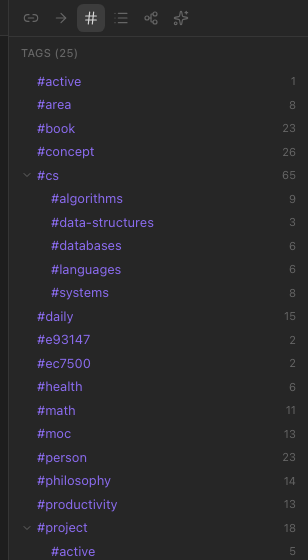
Every tag in the vault with how many notes carry it. Nested tags (#area/health) fold under their parent. Click a tag to search for it — the left sidebar switches to search with tag:#name filled in.
Tags in the graph
A graph group with the query tag:#book colours every note tagged #book. That is how the demo workspace gets its thirteen colours — see Graph view.
Tags in search
tag:#name in the search box, alone or with other words. Nested tags match their children: tag:#area finds #area/health too.