
Extending
MCP — use Nodum from any AI client
Nodum is an MCP server. Point Claude Code, Claude Desktop or Cursor at it with a token and the AI can do what you can — notes, links, search, import, export.
WhereSettings → MCP for the token and the copy-paste setup
What it is
The Model Context Protocol is how AI tools call other programs. Nodum speaks it: any MCP client — Claude Code, Claude Desktop, Cursor, and the rest — can connect and use 36 tools that do what the app does. Ask your assistant to "make a vault for the thesis, import these notes, link the chapters, colour the Sources folder blue" and it does exactly that, through the same rules and the same ownership checks the app applies.
The AI chat inside Nodum (see AI chat) is the other direction — Nodum calling a model with your key. MCP is your model calling Nodum.
Setting it up
- Settings → MCP. Copy the server URL — it is this site's address plus
/api/v1/mcp. - Create a token, named after where it will live. It is shown once; copy it.
- Paste the ready-made config for your client. Each one is generated with your URL and token filled in.
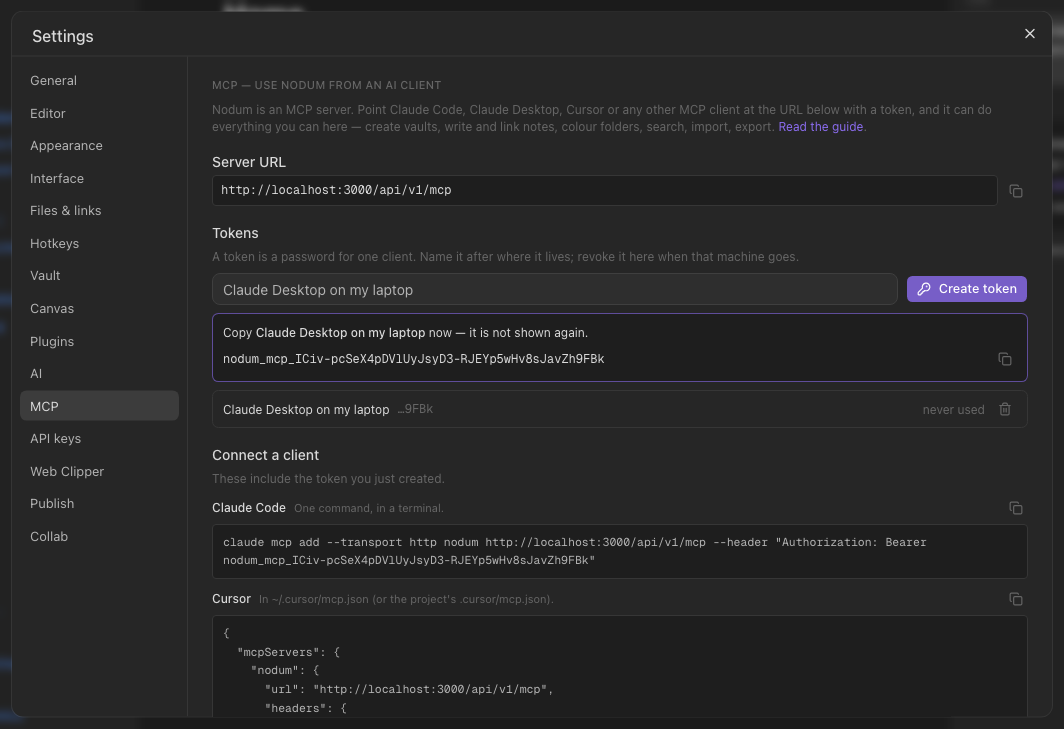
A token is a password for one program: it can do anything your account can, so treat it like one. Revoke it on this screen when the machine goes; the client stops working on its next call. Changing or resetting your password revokes every token too — mint new ones afterwards.
Connecting a client
Claude Code — one command:
claude mcp add --transport http nodum https://your-nodum/api/v1/mcp --header "Authorization: Bearer nodum_mcp_…"
Cursor — in ~/.cursor/mcp.json:
{ "mcpServers": { "nodum": { "url": "https://your-nodum/api/v1/mcp", "headers": { "Authorization": "Bearer nodum_mcp_…" } } } }
Claude Desktop speaks stdio, so mcp-remote bridges it — in claude_desktop_config.json (the token rides in env: on Windows an args entry with a space in it gets split):
{ "mcpServers": { "nodum": { "command": "npx", "args": ["-y", "mcp-remote", "https://your-nodum/api/v1/mcp", "--header", "Authorization:${AUTH_HEADER}"], "env": { "AUTH_HEADER": "Bearer nodum_mcp_…" } } } }
Anything else that supports Streamable HTTP with a bearer header works the same way. For a client that can only launch a stdio server, the repository ships a small bridge, packages/nodum-mcp (node packages/nodum-mcp/bin/nodum-mcp.js with NODUM_URL and NODUM_TOKEN in the environment) — it mirrors every tool and forwards each call to the HTTP endpoint, so the token never appears in an argument list.
Long tools report progress: an import of many files shows Imported 10 notes…, Resolving links and tags… in clients that display it (Claude Code does).
What the tools are
| Area | Tools |
|---|---|
| Vaults | list_vaults create_vault rename_vault delete_vault |
| Folders | get_tree create_folder rename_folder move_folder delete_folder |
| Notes | list_notes search_notes read_note create_note update_note (replace / append / prepend) rename_note move_note delete_note set_note_tags |
| Links & graph | link_notes get_backlinks get_outgoing_links get_graph list_tags |
| Colours | set_item_color list_item_colors set_graph_groups |
| In & out | import_markdown (many files at once) import_attachment (an image or file, base64 → an embed) list_attachments export_vault (files, or a zip) |
| Also | list_canvases create_canvas list_bookmarks bookmark_note daily_note list_templates |
Notes are addressed by id, path (Projects/Alpha) or title, so a model can say what it means. Deleting a vault or a folder needs confirm: true — a model has to mean it — and the last vault cannot be deleted at all.
An example session
You: Make a vault called Reading, put a note in it for each of these three books with a line about why I want to read it, link them from a note called Shelf, and colour the vault's Books folder green.
The assistant calls
create_vault,create_note×4 (three books plus Shelf with[[…]]links to each), andset_item_color— then tells you it is done, and it is. Open the vault: four notes, a backlink from Shelf on each book, a green folder, and the graph already drawn.
What it cannot do
Nothing outside your account: the token resolves to you, and every tool goes through the same ownership check as the app. There is no way to reach another user's vault, and no way to change your password or delete your account through MCP.