
Developers
API — connect your own apps
Create an API key and drive your vaults from any language over plain REST — list, search, read, write, link, unlink, tag, graph, even ask the AI.
WhereSettings → API keys for the key and a ready-made curl
What it is
Everything the app can do to a vault, as a plain REST API: list and read notes, create and edit them, search, link and unlink, tags, the graph, attachments — and asking your vault questions through the AI provider you configured. It is how a script, a cron job, a phone shortcut, or your own product talks to Nodum.
MCP is for AI clients that speak a protocol; this API is for programs you write. Same rules, same ownership checks, different door.
Setting it up
- Settings → API keys. Copy the base URL — this site's address plus
/api/public/v1. - Create key opens a dialog: name the key after the program it is for and tick what it may do (the scopes).
- The dialog then shows the key — once — beside a working
curlwith it already filled in. Copy either; paste the curl into a terminal and you have made your first API call.
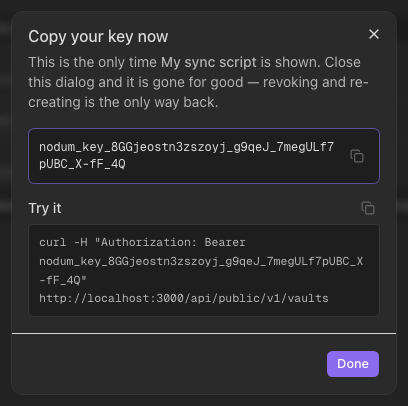
A key is a password for one program: treat it like one. Revoke it on this screen when the program goes; it stops working on its next call. Changing or resetting your password revokes every key — mint new ones afterwards.
The 60-second start
curl -H "Authorization: Bearer nodum_key_…" \
  https://your-nodum/api/public/v1/vaults
Take a vault id from the answer and go:
# Search it
curl -H "Authorization: Bearer nodum_key_…" \
  "https://your-nodum/api/public/v1/vaults/<vault_id>/search?q=reading"

# Create a note (folders are created as needed)
curl -H "Authorization: Bearer nodum_key_…" -H "Content-Type: application/json" \
  -d '{"title": "From the API", "folder": "Inbox", "content": "Linked to [[Reading list]]."}' \
  https://your-nodum/api/public/v1/vaults/<vault_id>/notes
Every success is {"ok": true, "data": ...}:
{ "ok": true, "data": { "id": "0198…", "title": "From the API", "path": "Inbox/From the API" } }
Every error is {"ok": false, "error": {...}} with a stable
SCREAMING_SNAKE code, a short message, and details carrying the
specifics:
{ "ok": false, "error": {
    "code": "VALIDATION_FAILED",
    "details": "body.title: Field required",
    "message": "Request validation failed." } }
Scopes
| Scope | What the key may do |
|---|---|
read | List and read vaults, notes, links, tags, search, the graph. |
write | Create and edit notes, link and unlink, tag, upload attachments. Write responses return metadata (id, path, timestamps) — never note bodies. |
delete | Delete notes and attachments. |
ai | Ask the vault questions. The AI's tools can also write notes — an ai key can change a vault even without write. |
A key without a scope gets 403 naming the missing one. Reads a key cannot
see — and anything that is not yours — are the same 404: the API never
confirms what exists outside the key's reach.
The interactive reference
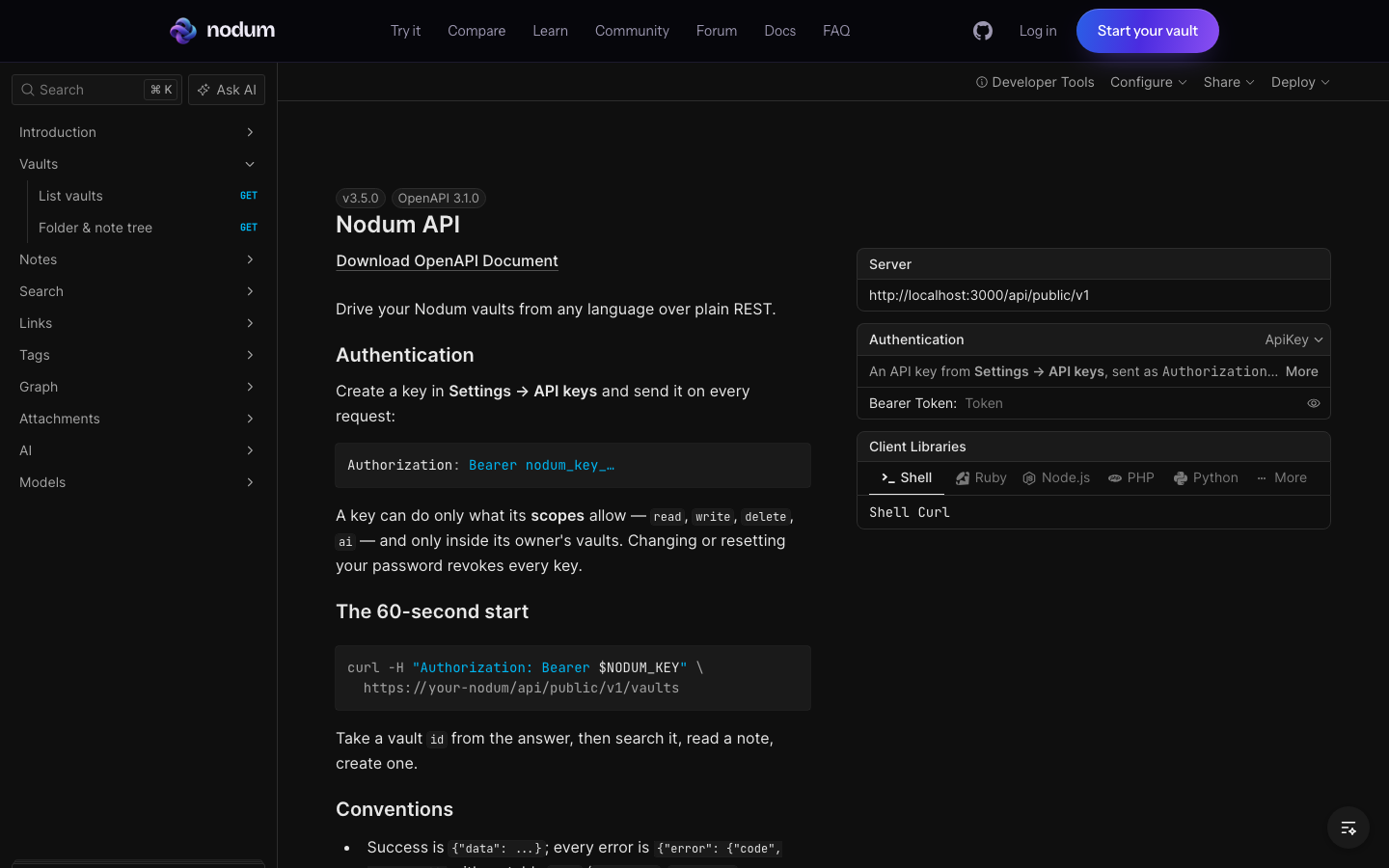
The full reference — every endpoint, schema, and error, with a try-it client — lives at /api-reference. Paste a key into its Auth box and requests run from the page, against your own vaults, with generated snippets for shell, Python, JavaScript and more.
Going deeper
Two guides walk every endpoint with copy-paste requests and real responses: working with notes and files and search, links, tags and the graph — and recipes turns them into small working programs.
Worth knowing
- Addressing notes — most endpoints take the note's
id;by-pathreads by exact path, and link targets accept an id, a path ("Projects/Alpha") or an exact title. When two notes share a title, the API asks for the path rather than guessing. - Note lists and search paginate —
limit+offsetin,totalout. Capped collections (tags, attachments) return whole; quick-switch returns the top matches. - Concurrent edits — send
base_updated_atwhen replacing content; a stale write returns409withdetails.server_updated_atso you can merge instead of overwrite.append/prependcompose on the server against the current body, so two concurrent appends both land (prepend stays below the frontmatter). - Unlink edits markdown — links are the
[[wikilinks]]in the text, so unlinking splices them out. Only forms that unambiguously mean the target are touched (its path, a unique title, an alias no other note claims) — a namesake's links are safe. Embeds (![[…]]) and links inside code are content and stay — an embed keeps counting as a link until you edit it out.removed: 0still succeeds. - AI answers take time —
POST …/ai/askruns the whole tool loop before answering; give your client a generous timeout (120s+). - Rate limits — each key gets its own budget (300 requests/minute by
default); over it is
429. - Up to 10 live keys per account, listed with only their last four characters — the full key exists in the create response and nowhere else.
What it cannot do
Nothing outside the key's account: every call resolves to you and goes through the same ownership checks as the app. There is no way to reach another user's vault, and no way to manage keys, change a password, or delete an account through the public API — that stays in the app.