
Organising
Canvas
A free-form board of cards you place and connect — for thinking out loud, planning, or laying out an argument.
WhereLeft sidebar → Canvases (below the file list) → +
What it is
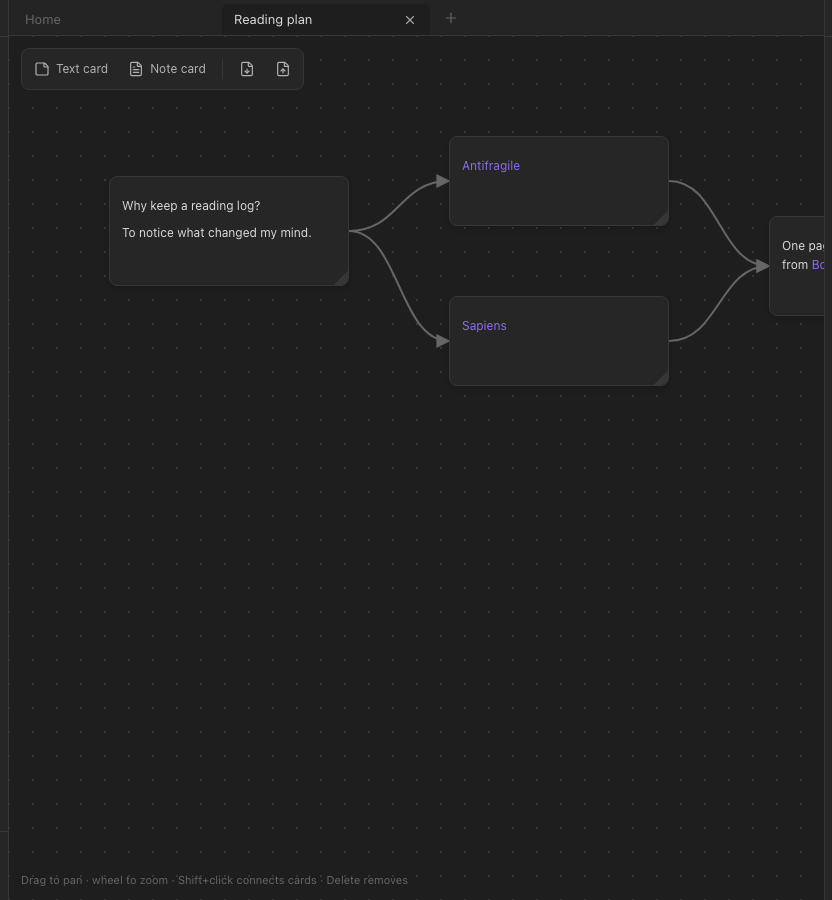
A canvas is an infinite board. Cards on it hold text; lines between cards show relations you draw yourself. Where a note is a page and the graph is computed, a canvas is a picture you arrange by hand.
Using it
- New canvas — the
+next to Canvases at the bottom of the file list, or the palette. - Add a card — Text card / Note card in the canvas toolbar (top-left).
- Move / resize — drag a card; drag its bottom-right corner.
- Connect — click a card, then
⇧-click the card to link it to. - Edit — double-click a text card and type;
Escfinishes. - Delete — select a card and press
⌫(its lines go with it).
Canvases save as they change and open in a tab like a note. Settings → Canvas chooses the background (dots, grid or blank).